
☕ Starbucks® Ultimate Nutrition Calculator
Over 70+ drinks • Calories & Caffeine • Full macros • Customize
Starbucks Calorie Calculator: How to Check Your Drink’s Nutrition Before You Order
A Starbucks calorie calculator is a tool that estimates the calories, sugar, fat, and other nutrients in a Starbucks drink based on your exact customization choices. Instead of guessing what your grande vanilla latte with oat milk and an extra shot really contains, you can see the numbers before you order. This guide explains how these calculators work, what they can and cannot do, and how to use one to make choices that actually fit your day.
Table of Contents
What Is a Starbucks Calorie Calculator?
A Starbucks calorie calculator is an online tool or app that lets you build a drink the way you would order it and see the nutrition totals update in real time. You pick the base drink, the size, the milk, the syrups, and any extras like whipped cream or an extra espresso shot. The calculator then adds up the calories and other nutrients for that specific combination.
The key word here is customization. A standard Starbucks menu lists nutrition for the default recipe. But most people do not order the default. They swap whole milk for almond milk, ask for half the pumps of syrup, or skip the whip. A calculator exists to capture those changes. Some tools are browser extensions, others are standalone websites, and a few are app-based .
How a Starbucks Calorie Calculator Works
Most calculators follow the same basic logic. They start with a nutrition database for each base drink and each ingredient, then combine them according to your selections. Here is the typical process in plain terms:
- Choose your drink. You select something like a Caffè Latte, Caramel Macchiato, or Mocha Frappuccino.
- Pick a size. Short, Tall, Grande, and Venti all change the base amount of milk, espresso, and syrup.
- Select your milk. Whole, 2%, nonfat, oat, almond, soy, and coconut milk each bring different calories and fat.
- Adjust syrups and sauces. You can often set the number of pumps or choose sugar-free versions.
- Add modifiers. Whipped cream, extra shots, cold foam, and drizzle all get added on top.
- Read the total. The calculator shows calories plus protein, carbs, fat, and sugar for your exact order.
A good calculator updates as you change each option, so you can see the difference between a Grande and a Tall, or between oat milk and nonfat milk, without doing the math yourself .
Why Customization Changes Everything
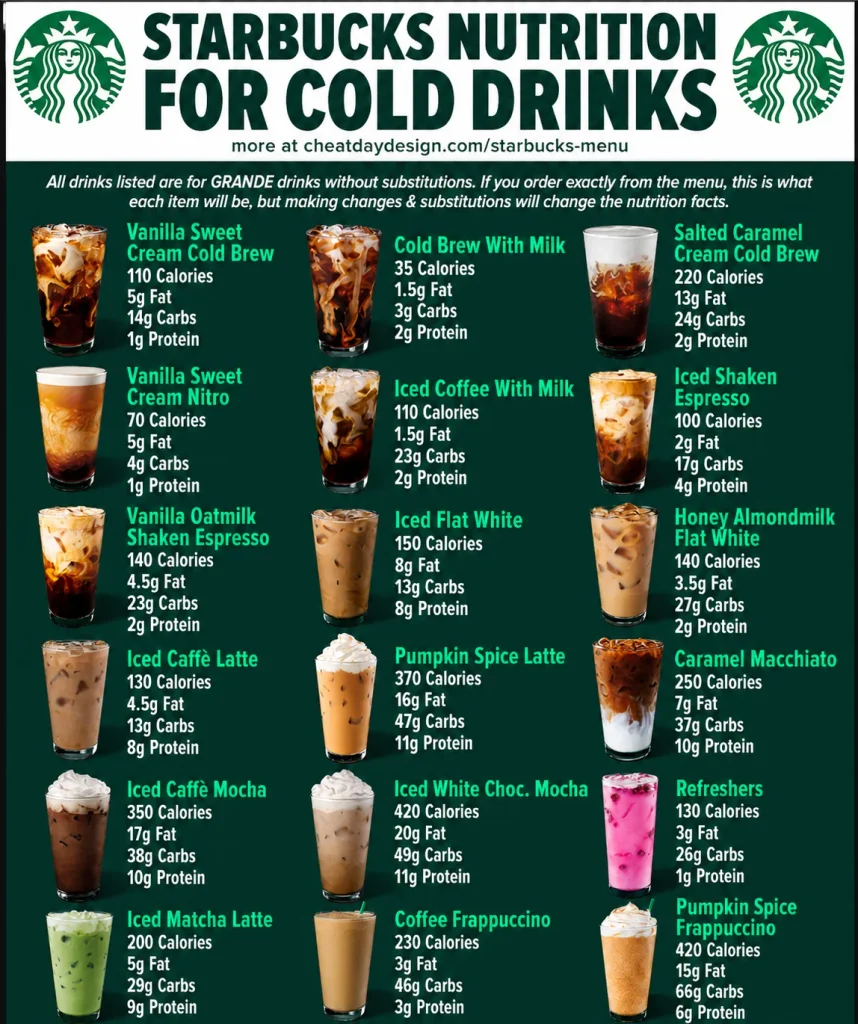
The gap between a “healthy-sounding” drink and a high-calorie one usually comes down to a few add-ons. A Grande Caffè Latte with 2% milk is around 190 calories. Swap in oat milk and add two pumps of vanilla syrup, and the number climbs. Add whipped cream and a caramel drizzle, and you are looking at a dessert, not a coffee.
This is where a calculator earns its keep. It shows you exactly which choice is costing you the most calories. Sometimes the answer surprises people. Whipped cream, for example, can add roughly 50 to 100 calories depending on the drink size . Flavored syrups add sugar quickly, while sugar-free syrups do not. Milk type matters more in milk-heavy drinks like lattes and less in an Americano.
The calculator turns those vague warnings into specific numbers for your actual order.
What to Look For in a Reliable Calculator
Not all calculators are built the same. Here is what separates a useful tool from a frustrating one.
Current menu data. Starbucks changes its menu, sizes, and recipes over time. A calculator that has not been updated in years will give you outdated numbers for seasonal drinks or reformulated syrups. Check whether the tool states when its data was last verified.
Full customization options. A calculator that only lets you pick the drink and size is missing the point. You want to adjust milk, syrup pumps, whipped cream, and extras. The best tools let you set the exact number of syrup pumps, not just “regular” or “light” .
Clear breakdown. Seeing a single calorie number is fine, but seeing where those calories come from is better. A breakdown by ingredient helps you decide whether to cut the syrup or switch the milk.
Regional accuracy. Starbucks recipes and cup sizes vary by country. A U.S. calculator may not match a U.K. or Japanese menu. Use a tool that matches your location, or treat the numbers as a close estimate rather than an exact match.
No fake precision. Handcrafted drinks are not measured to the gram. Baristas eyeball syrup pumps and milk pours. A calculator gives you a solid estimate, not a lab-grade measurement. Any tool that claims perfect accuracy is overselling.
Manual Ways to Estimate Starbucks Calories
If you do not want to use a calculator, you can still get a reasonable estimate. Starbucks publishes nutrition information for its standard menu items on its official website. That data covers the default recipe for each size. From there, you can adjust based on what you know about common swaps:
- Milk: Nonfat and almond milk are lower in calories than whole milk or oat milk. A Tall latte with almond milk can be around half the calories of the same drink with whole milk .
- Syrup: Each pump of regular syrup adds sugar and calories. Sugar-free syrup adds negligible calories. Asking for fewer pumps is a simple way to cut back.
- Whipped cream: Skipping it removes a meaningful chunk of calories, especially on Frappuccinos and mochas .
- Size: A Tall is smaller than a Grande, and a Short is smaller still. Downsizing a sweet drink cuts calories proportionally.
The limitation of manual estimation is that it gets messy when you combine several changes. That is the point where a calculator saves time.
Common Mistakes When Using a Calorie Calculator
Treating the number as exact. A calculator estimates based on standard recipes and ingredient data. Your actual drink may have slightly more or less syrup, milk, or whip. Use the number as a guide, not a guarantee.
Forgetting about food. A drink calculator only covers drinks. A breakfast sandwich or a pastry can easily match or exceed the calories in your coffee. If you are tracking your intake, the food counts too.
Assuming “light” means low-calorie. A drink labeled “light” or “skinny” may still contain more calories than you expect, especially if it is large or has added fruit puree or drizzle. Check the number rather than the marketing label.
Ignoring sugar. Calories are only one part of nutrition. A drink can be moderate in calories but high in sugar. Many calculators show sugar alongside calories, and it is worth paying attention to both.
Frequently Asked Questions
Is there an official Starbucks calorie calculator?
Starbucks provides nutrition information on its website for standard menu items, but it does not offer a dedicated interactive calculator that updates as you customize. Third-party tools fill that gap .
How accurate are Starbucks calorie calculators?
They are reasonably accurate for standard recipes and common customizations, but they are estimates. Barista preparation varies, and regional recipes differ. Treat the result as a close guide, not an exact measurement.
What is the lowest-calorie drink at Starbucks?
Black brewed coffee, cold brew, and Americano are among the lowest, often under 15 calories for a grande size without milk or sugar . Plain espresso is also very low in calories.
Does changing milk really make a difference?
Yes, especially in milk-based drinks. Switching from whole milk to nonfat or almond milk can cut the calorie count substantially in a latte or cappuccino. The difference is smaller in drinks with very little milk, like an Americano.
Why does my drink’s calorie count change when I add an extra shot?
An extra espresso shot adds a small number of calories on its own, but the bigger effect is often that people add more syrup or milk to balance the stronger coffee flavor. A calculator captures both the shot and any extras you add with it.
Can I use a calculator for seasonal drinks?
Some calculators include seasonal or limited-time drinks, but coverage varies. If a seasonal drink is not listed, you can estimate by finding a similar standard drink and adjusting for the likely syrups and toppings.
Do sugar-free syrups have zero calories?
They are very low in calories, often close to zero per pump, but they are not always completely calorie-free. Check the calculator or the brand’s nutrition data if you need an exact number.
Conclusion
A Starbucks calorie calculator takes the guesswork out of ordering. It shows you how your milk choice, syrup pumps, size, and toppings add up before you reach the register. Use it as a practical tool, not a source of perfect precision, and pay attention to the breakdown rather than just the total. The next time you open a Starbucks calorie calculator, you will know exactly what each customization costs and can order with a clearer picture of what is in your cup.